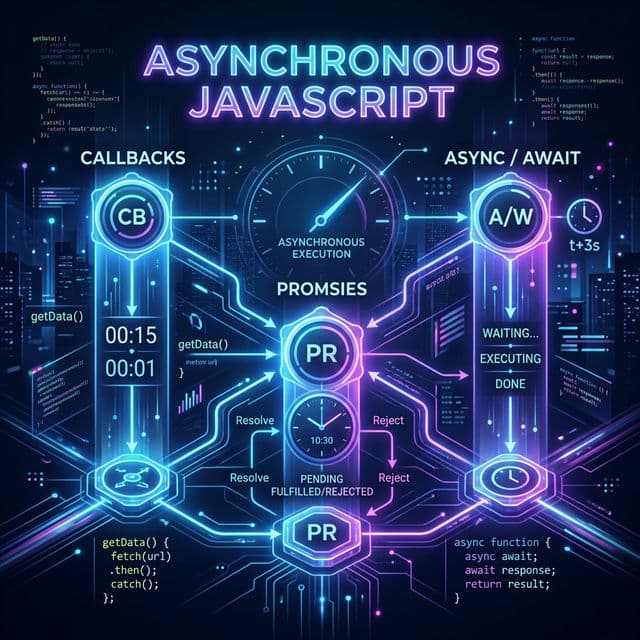
Asynchronous JavaScript
JavaScript is single-threaded — it can only do one thing at a time. But the real world is full of tasks that take time: fetching data from a server, reading a file, or waiting for a timer. Asynchronous programming lets JavaScript kick off a long-running task and continue executing other code in the meantime, rather than blocking the entire program.
This guide walks you through every major pattern, from the old-school callback to modern async/await.
Callbacks
A callback is simply a function passed as an argument to another function, to be called later when some work is done.
function fetchData(callback) {
  setTimeout(() => {
    const data = { id: 1, name: "Nisha" };
    callback(null, data); // null = no error
  }, 2000);
}

fetchData((err, data) => {
  if (err) {
    console.error("Error:", err);
    return;
  }
  console.log("Data received:", data);
});
The Problem — Callback Hell
When you have multiple dependent async operations, callbacks nest deeply, creating code that is hard to read and maintain. This pyramid of doom is called Callback Hell.
login(user, (err, session) => {
  if (err) return handleError(err);
  fetchProfile(session, (err, profile) => {
    if (err) return handleError(err);
    fetchPosts(profile, (err, posts) => {
      if (err) return handleError(err);
      render(posts); // 😰 deeply nested
    });
  });
});
Why We Need Promises?
Promises were introduced to solve callback hell. A Promise represents a value that may not be available yet but will be resolved at some point in the future (or rejected with an error).
Benefits of Promises over Callbacks:
- Flat, readable chaining instead of nested callbacks
- Unified error handling with
.catch() - Composability with static methods like
Promise.all() - Foundation for
async/await
The Promise Object
A Promise can be in one of three states:
| State | Description |
|---|---|
| Pending | Initial state; neither fulfilled nor rejected |
| Fulfilled | The operation completed successfully |
| Rejected | The operation failed |
You create a Promise using the Promise constructor, which receives an executor function with two parameters: resolve and reject.
const myPromise = new Promise((resolve, reject) => {
  const success = true;

  if (success) {
    resolve("Operation successful! ✅");
  } else {
    reject(new Error("Something went wrong ❌"));
  }
});
Once a Promise settles (fulfills or rejects), it cannot change state — it is immutable.
then(), catch(), finally()
These three methods are how you consume a Promise.
.then(onFulfilled, onRejected?)
Called when the Promise is fulfilled. Receives the resolved value.
myPromise.then((value) => {
  console.log(value); // "Operation successful! ✅"
});
.catch(onRejected)
Called when the Promise is rejected. Think of it as .then(null, onRejected).
const failingPromise = new Promise((_, reject) => {
  reject(new Error("Network error"));
});

failingPromise.catch((err) => {
  console.error(err.message); // "Network error"
});
.finally(onFinally)
Called regardless of whether the Promise fulfilled or rejected. Perfect for cleanup tasks (e.g., hiding a loading spinner).
fetchUser()
  .then((user) => console.log(user))
  .catch((err) => console.error(err))
  .finally(() => {
    console.log("Request complete — hide the spinner");
  });
Chaining Promises
Each .then() returns a new Promise, which allows you to chain multiple async steps in a clean, flat structure.
fetch("https://api.example.com/user/1")
  .then((response) => response.json())       // Step 1: parse JSON
  .then((user) => fetch(`/posts?userId=${user.id}`)) // Step 2: fetch posts
  .then((response) => response.json())       // Step 3: parse posts JSON
  .then((posts) => {
    console.log("Posts:", posts);            // Step 4: use data
  })
  .catch((err) => {
    console.error("Chain failed:", err);     // catches any error above
  });
Key Rule: If a
.then()callback returns a value, the next.then()receives that value. If it returns a Promise, the chain waits for that Promise to settle.
Promise Static Methods
a) Promise.all()
Takes an array of Promises and returns a single Promise that:
- Fulfills when all input Promises fulfill, with an array of their results.
- Rejects immediately if any one Promise rejects.
Use it when tasks are independent and you need all results.
const p1 = fetch("/api/users").then((r) => r.json());
const p2 = fetch("/api/posts").then((r) => r.json());
const p3 = fetch("/api/comments").then((r) => r.json());

Promise.all([p1, p2, p3])
  .then(([users, posts, comments]) => {
    console.log(users, posts, comments); // all resolved together
  })
  .catch((err) => {
    console.error("One of the requests failed:", err);
  });
b) Promise.race()
Returns a Promise that settles as soon as the first input Promise settles (either fulfills or rejects).
Use it for timeout patterns or when you only care about whichever response arrives first.
const dataFetch = fetch("/api/slow-endpoint").then((r) => r.json());
const timeout = new Promise((_, reject) =>
  setTimeout(() => reject(new Error("Request timed out ⏱️")), 3000)
);

Promise.race([dataFetch, timeout])
  .then((data) => console.log("Got data:", data))
  .catch((err) => console.error(err.message));
c) Promise.allSettled()
Returns a Promise that fulfills when all input Promises have settled (fulfilled or rejected). The result is an array of objects describing each outcome.
Use it when you need all results regardless of individual failures.
const promises = [
  Promise.resolve("✅ Success"),
  Promise.reject(new Error("❌ Failed")),
  Promise.resolve("✅ Also Success"),
];

Promise.allSettled(promises).then((results) => {
  results.forEach((result) => {
    if (result.status === "fulfilled") {
      console.log("Value:", result.value);
    } else {
      console.log("Reason:", result.reason.message);
    }
  });
});

// Value: ✅ Success
// Reason: ❌ Failed
// Value: ✅ Also Success
d) Promise.any()
Returns a Promise that fulfills as soon as any one of the input Promises fulfills. It only rejects if all of them reject (with an AggregateError).
Use it when you have multiple sources and only need the first success.
const mirrors = [
  fetch("https://mirror1.example.com/file"),
  fetch("https://mirror2.example.com/file"),
  fetch("https://mirror3.example.com/file"),
];

Promise.any(mirrors)
  .then((response) => console.log("Fastest mirror responded:", response.url))
  .catch((err) => console.error("All mirrors failed:", err));
Quick Comparison
| Method | Fulfills when | Rejects when |
|---|---|---|
Promise.all | All fulfill | Any one rejects |
Promise.race | First settles | First rejects |
Promise.allSettled | All settle (always) | Never rejects |
Promise.any | Any one fulfills | All reject |
Async / Await
async/await is syntactic sugar built on top of Promises, introduced in ES2017. It lets you write asynchronous code that looks and reads like synchronous code.
async Function
Placing async before a function declaration makes it always return a Promise (wrapping non-Promise values automatically).
async function greet() {
  return "Hello!";
}

greet().then(console.log); // "Hello!"
await Expression
await pauses execution inside an async function until the Promise settles, then returns the resolved value. It can only be used inside async functions (or at the top level of ES modules).
async function getUser() {
  const response = await fetch("https://jsonplaceholder.typicode.com/users/1");
  const user = await response.json();
  console.log(user.name); // "Leanne Graham"
}

getUser();
Error Handling with async/await
Use try...catch to handle errors (rejections) in async functions.
async function loadData() {
  try {
    const response = await fetch("https://api.example.com/data");

    if (!response.ok) {
      throw new Error(`HTTP error! Status: ${response.status}`);
    }

    const data = await response.json();
    console.log("Data:", data);
  } catch (err) {
    console.error("Failed to load data:", err.message);
  } finally {
    console.log("Done loading");
  }
}

loadData();
Fetch API
The Fetch API is the modern, browser-native way to make HTTP requests. It returns a Promise.
fetch("https://jsonplaceholder.typicode.com/posts/1")
  .then((response) => {
    if (!response.ok) {
      throw new Error(`HTTP error! Status: ${response.status}`);
    }
    return response.json();
  })
  .then((post) => console.log(post))
  .catch((err) => console.error("Fetch failed:", err));
POST Request with Fetch
async function createPost() {
  const response = await fetch("https://jsonplaceholder.typicode.com/posts", {
    method: "POST",
    headers: {
      "Content-Type": "application/json",
    },
    body: JSON.stringify({
      title: "Async JavaScript",
      body: "This is a great blog post.",
      userId: 1,
    }),
  });

  const newPost = await response.json();
  console.log("Created:", newPost);
}

createPost();
Important Gotcha
Fetch only rejects on network failures (e.g., no internet). A 404 or 500 response is not thrown as an error — you must manually check response.ok.
// ❌ This will NOT throw even on a 404
fetch("/non-existent-url");

// ✅ Correct approach
const response = await fetch("/non-existent-url");
if (!response.ok) throw new Error(`Status: ${response.status}`);
Axios
Axios is a popular third-party HTTP client library that works in both the browser and Node.js. It improves on the native Fetch API with several conveniences.
Install it:
npm install axios
GET Request
import axios from "axios";

async function getUser() {
  try {
    const response = await axios.get(
      "https://jsonplaceholder.typicode.com/users/1"
    );
    console.log(response.data); // Axios automatically parses JSON
  } catch (err) {
    console.error("Error:", err.message);
  }
}

getUser();
POST Request
async function createPost() {
  try {
    const response = await axios.post(
      "https://jsonplaceholder.typicode.com/posts",
      {
        title: "Async JavaScript",
        body: "Written with Axios!",
        userId: 1,
      }
    );
    console.log("Created:", response.data);
  } catch (err) {
    console.error("Error:", err.response?.data || err.message);
  }
}
Fetch vs Axios
| Feature | Fetch | Axios |
|---|---|---|
| Built-in | ✅ Yes | ❌ Needs install |
| Auto JSON parse | ❌ Manual .json() | ✅ Automatic |
| HTTP error detection | ❌ Manual response.ok check | ✅ Throws on 4xx/5xx |
| Request cancellation | ✅ AbortController | ✅ CancelToken / AbortController |
| Request/response interceptors | ❌ No | ✅ Yes |
| Node.js support | ❌ (needs polyfill) | ✅ Yes |
XMLHttpRequest (Legacy)
XMLHttpRequest (XHR) is the original way to make asynchronous HTTP requests in browsers, predating both Fetch and Axios. You may encounter it in older codebases.
const xhr = new XMLHttpRequest();

// 1. Configure the request
xhr.open("GET", "https://jsonplaceholder.typicode.com/posts/1");

// 2. Set up the response handler
xhr.onload = function () {
  if (xhr.status === 200) {
    const data = JSON.parse(xhr.responseText);
    console.log("Data:", data);
  } else {
    console.error("Error:", xhr.statusText);
  }
};

// 3. Handle network errors
xhr.onerror = function () {
  console.error("Network error occurred");
};

// 4. Send the request
xhr.send();
POST with XHR
const xhr = new XMLHttpRequest();
xhr.open("POST", "https://jsonplaceholder.typicode.com/posts");
xhr.setRequestHeader("Content-Type", "application/json");

xhr.onload = () => {
  if (xhr.status === 201) {
    console.log("Created:", JSON.parse(xhr.responseText));
  }
};

xhr.send(
  JSON.stringify({
    title: "Hello",
    body: "World",
    userId: 1,
  })
);
Note: In modern development, prefer Fetch or Axios over XHR. XHR's event-based, callback-heavy API is harder to maintain and does not integrate with Promises natively.
Error Handling (try...catch)
Robust async code always handles errors gracefully. The try...catch block is the standard mechanism.
Basic Structure
try {
  // Code that might throw
  const result = await riskyOperation();
  console.log(result);
} catch (err) {
  // Handle the error
  console.error("Caught:", err.message);
} finally {
  // Always runs — cleanup code here
  console.log("Done");
}
Handling Different Error Types
async function fetchPost(id) {
  try {
    const response = await fetch(`https://api.example.com/posts/${id}`);

    if (!response.ok) {
      // HTTP-level error (4xx, 5xx)
      throw new Error(`HTTP ${response.status}: ${response.statusText}`);
    }

    return await response.json();
  } catch (err) {
    if (err instanceof TypeError) {
      // Network error (no internet, DNS failure, etc.)
      console.error("Network error:", err.message);
    } else {
      // HTTP error or parsing error
      console.error("Request failed:", err.message);
    }
    return null; // Return a fallback value
  }
}
Global Unhandled Rejection Handler
In Node.js or the browser, you can catch unhandled Promise rejections globally:
// Browser
window.addEventListener("unhandledrejection", (event) => {
  console.error("Unhandled Promise rejection:", event.reason);
});

// Node.js
process.on("unhandledRejection", (reason, promise) => {
  console.error("Unhandled Rejection at:", promise, "reason:", reason);
});
Best Practices
- Always
awaitinside atry...catch— do not let Promises float unhandled. - Be specific in your
catch— handle network errors differently from business logic errors. - Use
finallyfor teardown (closing connections, hiding spinners) so it always runs. - Avoid swallowing errors silently with an empty
catchblock.
// ❌ Don't do this
try {
  await doSomething();
} catch (e) {} // Silent swallow — bugs become invisible

// ✅ Always log or re-throw
try {
  await doSomething();
} catch (e) {
  console.error(e);
  throw e; // re-throw if the caller should also know
}
Summary
| Concept | Purpose |
|---|---|
| Callbacks | Original async pattern; simple but leads to callback hell |
| Promises | Cleaner async with .then()/.catch(), chainable |
| Promise.all | Run multiple Promises in parallel; fail fast |
| Promise.race | Take the first settled result |
| Promise.allSettled | Get all results regardless of failures |
| Promise.any | Take the first successful result |
| async/await | Syntactic sugar over Promises; reads like sync code |
| Fetch API | Native browser HTTP client; returns Promises |
| Axios | Feature-rich HTTP library with auto-parsing & interceptors |
| XMLHttpRequest | Legacy XHR; event-based; avoid in new code |
| try...catch | Handle errors in async functions cleanly |
Asynchronous JavaScript has come a long way — from nested callback pyramids to the elegant async/await syntax we have today. Master these patterns and you'll be able to write code that handles any async challenge the real world throws at you.